
The Real Problem: You Don't Have a Screen Problem, You Have a Feed Problem
According to global digital consumption telemetry, the average smartphone user spends 4 hours and 37 minutes looking at their phone screen each day.
When people look at that number, they assume their entire phone is the enemy. But if you analyze your battery and application breakdown, a striking pattern emerges:
- Utility Apps (Low Friction): Google Maps, banking, Uber, WhatsApp chats, Wikipedia, Spotify. You open them with a deliberate goal, complete the task in 2 minutes, and put the phone down.
- Infinite Feed Apps (High Dopamine): Instagram Reels, YouTube Shorts, TikTok. You open them intending to watch one clip or reply to a DM, and emerge 45 minutes later with dry eyes and severe attention fatigue.
The phone itself is not the problem. The utility apps are not the problem. The culprit stealing 70% of your daily screen time is the infinite vertical swipe feed.
The Science: Why Willpower Always Fails Against Modern Algorithms
Most productivity articles offer advice rooted in shame and self-control: "Just be more disciplined" or "Put your phone in another room."
Neuroscience proves why willpower is an architectural mismatch against modern recommendation systems:
- Variable Ratio Reinforcement: In peer-reviewed behavioral research indexed by the National Institutes of Health (PubMed), variable rewards (delivering unexpected novelty at unpredictable intervals) produce the most compulsively persistent habits known to behavioral science. Infinite video feeds function identically to Las Vegas slot machines: every thumb flick is a pull of the lever.
- Dopamine Homeostasis and Tolerance: Clinical research directed by Dr. Anna Lembke at Stanford University School of Medicine (author of Dopamine Nation) reveals that continuous spikes of unnatural dopamine prompt the brain's neurobiological pleasure-pain scale to downregulate baseline dopamine receptors. This creates an immediate "dopamine deficit state": a feeling of mild restlessness and brain fog that drives an uncontrollable urge to pick up the phone and swipe again.
- Cognitive Switching Penalty: Studies published by the American Psychological Association (APA) demonstrate that even brief micro-distractions cost up to 23 minutes of focus recovery time, draining prefrontal executive function throughout the day.
Why Traditional App Blockers and Digital Wellbeing Fail
Before adopting a working strategy, it is critical to understand why previous attempts failed:
| Approach | Why It Fails | The Real-World Outcome |
|---|---|---|
| Deleting the App | You cut off direct messages, university group chats, and creator tutorials you actually need. | Reinstalled within 48 hours; bingeing returns stronger than before. |
| Digital Wellbeing App Limits | App timer closes the entire app when the timer hits zero, cutting off urgent DMs along with Reels. | User repeatedly taps "Ignore limit for today", breaking the habit contract. |
| Expensive iOS/Android Blockers ($100/yr) | Lock the whole phone or force frustrating 15-second breathing delays on every single app opening. | Deleted or disabled within a week due to daily workflow friction. |
| Surgical Feed Interception (ScrollDetox) | Separates the feed from the utility. Leaves DMs, posts, and long tutorials intact. | Zero temptation to bypass; sustainable, effortless reduction of 2+ hours daily. |
The 5-Step Friction Blueprint to Cut 2+ Hours of Daily Screen Time
Here is a realistic, practical framework you can configure on your Android phone today:
Step 1: Perform the Utility Triage
Open your phone's Settings > Apps. Categorize every installed app into two lists:
- Type A (Tools & Direct Messaging): Signal, WhatsApp, Gmail, Maps, Banking, Calendar, Notes. Keep these readily available.
- Type B (Algorithmic Consumption): Instagram, YouTube, TikTok, Reddit, Twitter/X. These contain addictive autoplay feeds paired with useful utility.
Step 2: Triage Notifications (Human vs. Algorithmic)
Never turn off notifications blindly. That causes anxiety that you are missing messages from family or work. Instead, use Android's granular notification channels:
- Open Settings > Notifications > App Settings > Instagram.
- Keep ON: Direct Messages, Video Chats, Mentions.
- Turn OFF: Reels recommendations, "X just posted for the first time in a while", Suggested accounts, Live video notifications.
- Repeat for YouTube: Keep subscription uploads ON, turn Recommended videos and Shorts notifications OFF.
Step 3: Relocate Icons (The 20-Second Muscle Memory Barrier)
Most doomscrolling sessions do not begin consciously. They happen when your thumb subconsciously taps the Instagram icon on your home dock while checking the weather.
Move every Type B application off your home screen dock. Place them in a generic folder named "Media" on your second home screen page. Adding just 2 seconds of physical friction breaks the unconscious loop and gives your prefrontal cortex time to ask: "Why am I opening this right now?"
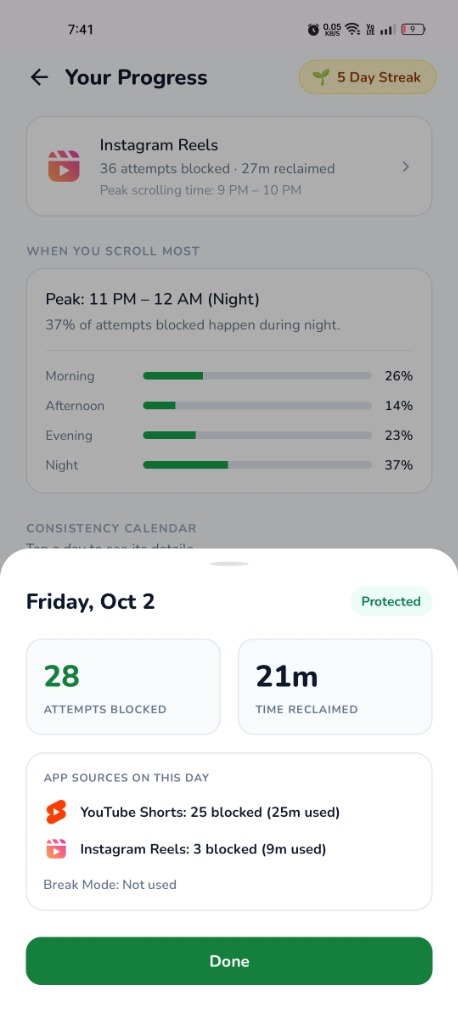
Step 4: Deploy Surgical Feed Blocking with ScrollDetox
Rather than relying on willpower when you do open Instagram or YouTube, let your phone enforce the boundary automatically:
- Install ScrollDetox free from Google Play.
- Enable the local Android Accessibility permission (runs 100% on-device with zero tracking or account registration).
- Select Strict Mode to exit Reels and Shorts fullscreen players instantly the moment they appear.
- Or choose 1-Pass Mode: You can watch any specific video a friend shares via DM, but the moment you swipe down into algorithmic autoplay, the app navigates you back to the chat.
Step 5: Schedule Circadian Wind-Down Grayscale
According to clinical sleep research from Harvard Medical School, late-night high-contrast blue and neon light from smartphone displays suppresses melatonin secretion and delays deep REM sleep.
On Android, go to Settings > Digital Wellbeing > Bedtime Mode. Schedule your screen to transition to monochrome grayscale at 10:00 PM. Stripped of saturated colors, the dopamine reward value of social feeds plummets, making it easy to put the phone down and sleep.